
Occupational therapy · Clinic group procurement
Occupational Therapy Equipment for Multi-Site Clinics
Buying for several rehabilitation centres starts with one clear configuration list—not one identical equipment package for every branch.
Updated by RehabIntl:
Can RehabIntl quote occupational therapy equipment for several centres?
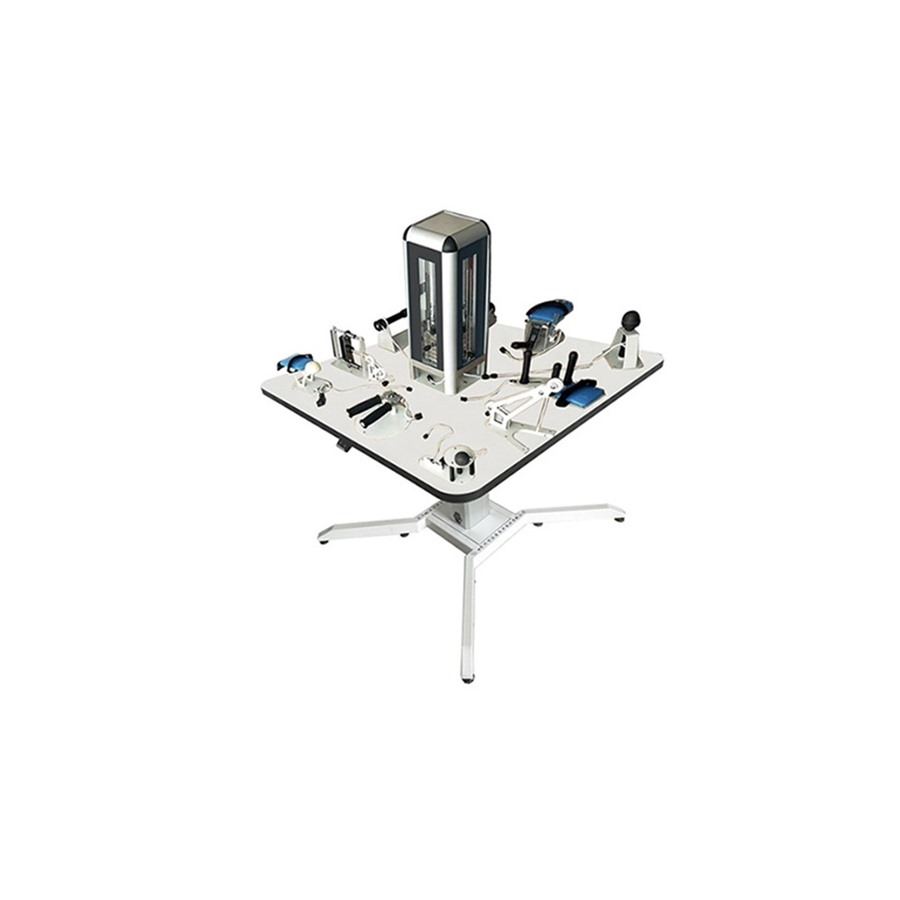
You can send RehabIntl a combined model-and-quantity enquiry for your clinic group. Our range includes standard, electric and software-supported KF-SGZ upper-limb activity tables. Specify the configuration for each branch, then ask for itemised equipment, accessories and delivery scope. A bulk enquiry does not establish a fixed discount or a complete OT department package.
Which occupational therapy equipment should each branch request?
Start with your teams' planned hand, arm, coordination and task-based activities. List the workstations, access and storage each room needs. Our occupational therapy equipment range is a product shortlist, not a replacement for those requirements.
For a clinic group, standardise the required activities before standardising the hardware. One branch may need powered adjustment, while another may not. A room with a defined digital workflow needs a separate software review rather than an assumption that every table should include software.
| KF-SGZ configuration | Reason to review it | What to settle in the quote |
|---|---|---|
| Standard upper-limb training table | Task-oriented activities in a multifunctional workstation | Included modules, dimensions, adjustment and replacement parts |
| Electric upper-limb training table | A room requirement for powered adjustment | Exact electric functions, range, voltage, frequency and plug |
| Upper-limb table with software | A defined software-supported training requirement | Hardware, functions, language, licence and system requirements |
The catalog uses KF-SGZ across these versions. Do not put “KF-SGZ, several units” on an order and leave the version unstated. A common model code is not evidence that modules, controls or software are the same.
Use one branch allocation sheet for the bulk order
Copy the row below for each configuration at each destination. Keep optional items separate so your purchasing team can see whether an apparent price difference comes from quantity or from a different supply scope.
| Branch / destination | Version and quantity | Requirements to confirm |
|---|---|---|
| Branch code: _____ Country / delivery point: _____ | Standard / electric / software: _____ Quantity: _____ | Activity modules: _____ Access and dimensions: _____ Applicable power details: _____ Selected accessories: _____ |
| Branch code: _____ Country / delivery point: _____ | Standard / electric / software: _____ Quantity: _____ | Activity modules: _____ Access and dimensions: _____ Applicable power details: _____ Selected accessories: _____ |
Use branch identifiers, not patient records. Where a field is unresolved, mark it pending and name the team that will answer it. Do not count a photographed accessory as included without a written parts list.
Should you use one receiving point or several?
Ask for a quotation against your proposed delivery arrangement. A single receiving warehouse requires a plan for onward distribution, component identification and responsibility for repacking if needed. Separate branch destinations require separate delivery information and an agreed shipment scope.
For either route, request package identification, packed dimensions, gross weight and the allocation of each table and accessory set. Do not assume a mixed-model quotation includes delivery to every branch, local assembly or staff training. Have those services and exclusions stated separately.
How can you compare wholesale OT equipment prices fairly?
Use the same versions, quantities, module lists and delivery point across offers. Request any proposed quantity pricing against that written scope, with the quotation's validity and exclusions. This article provides no verified bulk-price schedule or promised discount.
For the software version, compare licence and supplied hardware separately from the table. Otherwise an offer excluding the computer or using different licence terms can look cheaper without covering the same requirement. If a branch has no confirmed software need, quote that option separately rather than adding it by default.
What to confirm before purchase
- Exact KF-SGZ version, quantity and configuration at each branch.
- Included activities, modules, supports and separately selected accessories.
- Dimensions, adjustment, access and applicable electrical requirements.
- Software language, licence, hardware and support scope where relevant.
- Destination allocation, package data, assembly, requested documents and agreed service responsibilities.
Send your branch allocation sheet through our quotation enquiry. State whether you want a consolidated order or separate destination offers. Confirm for the exact model and destination market.
Buyer FAQ
Can one KF-SGZ specification be repeated across every centre?
Only after each branch's team has reviewed the same confirmed configuration against its activities, access and operating requirements. Do not standardise an unresolved specification.
Does a bulk order automatically include a wholesale discount?
No discount is established here. Ask for a current quantity-based quotation identifying the exact configuration and delivery scope.
Does this range cover every item needed in an OT department?
No complete-department coverage is established. Send your full activity and equipment list, and ask which requirements are covered by the quoted models and which need a separate response.